"We've been hit by ransomware. Can we actually get our data back?"
That is the first question the people handling the response run into the moment the damage is discovered.
In real incidents, the calls start coming in as soon as people arrive at the office in the morning: "My PC won't start," "There are files with an extension I've never seen." Someone scrambles to cut off the network, but then nobody knows what to decide next or how far to go, and time simply slips away. Situations like this are by no means rare.
To be frank, fully recovering from a ransomware attack is not easy. Recent surveys show that about 70% of companies have not been able to restore their environment to its original state. On top of that, about half of companies spent 10 million yen or more on recovery, and about 30% took more than a month to resume operations. The numbers alone make it clear that this is not just an IT problem but one that affects the business itself.
This article tackles the frontline question "Can we really recover?" head on. We look at actual recovery success rates, benchmarks for cost and time, the first steps to take right after an infection, the recovery methods companies actually choose, and the pitfalls common to companies that could not recover.
Preparation in advance is what matters most in dealing with ransomware.
Be sure to also check the initial response you need before recovery.
At CyberCrew, our white-hat hackers can verify how an attacker could actually break in, from the attacker's point of view, through vulnerability assessments and penetration testing, and help you put security measures in place. We also take inquiries about emergency response, so please get in touch first.
Can data be recovered after a ransomware infection? [The short answer]
If you have been hit by ransomware, your biggest concern is probably "Will we get all the data back?"
Honestly, even when some of it can be restored, it is rare to recover everything exactly as it was.
Even if you have backups, you cannot restore safely if they have already been encrypted or if you cannot confirm that they really reflect the state before the infection.
In practice, a delayed initial response or a long struggle to determine the scope of the damage often drags recovery out far longer than expected.
In the end, whether you can recover is not a matter of luck. The outcome depends heavily on how well prepared you were in advance and how you acted right after the infection.
The reality of recovery success rates: 70% of companies do not fully recover
According to a survey by ITR published in 2025, about 70% of companies hit by ransomware since 2024 have not achieved full recovery.
"Could not recover" here does not mean they were unable to resume business at all. Most of these companies managed to keep minimum operations running but could not get back to where they were before.
The same trend appears in an international survey by Veeam, a company known for backup and recovery.
It reports that about one in three companies failed to recover.
Even more sobering for those in the field: only 8% of companies that paid the ransom got all of their data back.
In real incidents, it is not unusual for the decryption key never to arrive, for the decryption tool to stop partway through, or for decryption to succeed but leave the data corrupted and unusable.
What the numbers show is that the hope that "paying the ransom will sort it out" can hardly be relied on in reality.
Given these statistics and real cases, full recovery from a ransomware attack is by no means something you can take for granted; you need to assume that even when it works, it is closer to an exceptional success.
Why recovery fails: three main causes
Looking at cases where companies could not recover from ransomware, the failure patterns are fairly consistent.
These are the three we see most often.
The most common is the case where the backups themselves had been encrypted.
In recent attacks it has become standard practice to hunt for backup servers and NAS devices before going after production data, so it is not unusual for the assumption "we have backups, so we're fine" to be broken from the very start.
The next problem is not being able to decide which backup to use.
If you cannot see the intrusion path or how far the attacker moved laterally, the backup you are trying to restore may already have been tampered with. As a result, recovery work often has to be halted midway or started over, and time simply slips away.
The third is the case where identifying the scope of the damage took far longer than expected.
When the impact has spread across several areas such as Active Directory, file servers and cloud environments, the investigation alone, before recovery even begins, consumes a great deal of effort.
Seeing these responses first hand, we feel that the idea that "having backups = being safe" no longer holds up in the field.
The decisive difference between companies that recovered and those that did not
Comparing companies that managed to recover with those that did not, there is a clear difference in how they responded.
At companies that recovered successfully, the backups were almost always kept somewhere isolated from the network, and the NAS and backup servers had not been directly hit.
They also had in common that they had run recovery drills in advance to confirm they "could actually restore."
When the time came, everyone on the ground knew what to restore and in what order.
Conversely, among companies whose recovery did not go well, many used USB hard drives or permanently connected external storage as backup, and these were encrypted along with the production data.
It is also common to hear that recovery procedures had not been documented, and time ran out while people on the ground hesitated over decisions.
Seen this way, the difference is not "whether there were backups." It is how they were stored, and whether you had checked in advance that you could really restore from them. That difference is exactly what decides whether recovery succeeds.
The cost and time of ransomware recovery [latest 2026 data]

When a company faces a ransomware attack, the IT staff handling the response always get the same questions.
"How much will this cost in the end?" "When can we get operations back?"
In most cases, these are the first things management wants to confirm.
Yet there is hardly ever an optimistic answer to either.
Looking at real incident responses, the usual reality is that it costs more than expected and takes longer than anyone thought.
Surveys by the National Police Agency (NPA) and overseas researchers show the same clear trend. Apart from a few exceptions, it is safest to assume that ransomware recovery will be expensive and drawn out.
Here, based on survey data in actual use, we lay out the minimum benchmarks for cost and time that management should keep in mind when making decisions.
Typical recovery costs: about half spend 10 million yen or more
According to the ransomware damage survey published by the National Police Agency for 2025 (Reiwa 7), 23 of 39 companies, about 59% of the total, spent 10 million yen or more on their recovery response.
Of those, 7 companies, about 18% of the total, needed 50 million yen or more, clearly showing that costs jump sharply as the scale of the damage grows.
Meanwhile, only 6 cases, about 15% of the total, were kept under 1 million yen, so the idea that "it will be cheap if we only do the bare minimum of recovery" is not realistic. For mid-sized and large companies in particular, losses from business disruption and the cost of external response weigh heavily.
Overseas, Sophos reports that the average recovery cost, excluding the ransom, is about $2.73 million (about 400 million yen). This includes costs such as:
- Incident response and forensic investigation
- System rebuilding and data recovery
- Business disruption and lost revenue
- Security investment to prevent recurrence
Taken together, ransomware recovery has to be seen not as "an unexpected expense" but as "a loss that is a business risk."
Typical recovery timelines: 70% take a week or more, 30% a month or more
When it comes to recovery time, expecting a quick resolution is also dangerous.
According to the 2025 (Reiwa 7) National Police Agency survey, only 10 of 47 companies, about 21% of the total, recovered within the same day to less than a week.
Meanwhile, about 32% took between one week and one month, and about 47% needed more than a month, including those still recovering.
The main reason recovery drags on is that there are a great many steps to complete before restoration work can even begin: identifying the scope of the damage, investigating the intrusion path, checking that backups are sound, and so on.
As a result, it is not unusual for it to take weeks or even months before operations resume.
For what to do after recovery and protection software to prevent recurrence, see the article below.
Best Ransomware Protection Software Compared (2026): A Complete Guide for Individuals and Businesses
Should you pay the ransom? The reality that paying does not guarantee recovery
The short answer is that you should not pay the ransom.
As the statistics show, companies that got all of their data back after paying are rare.
In other words, paying is not a way to guarantee recovery.
In practice, many cases have been reported in which the decryption key was never provided, the decryption tool supplied did not work properly, or data was corrupted during decryption.
On top of that, giving in to the demand raises the risk of being extorted again or facing additional demands.
The reason the National Police Agency and security agencies around the world strongly oppose paying ransoms is not only that it funds criminal organizations, but that it does not end up protecting the victim company itself.
From a recovery standpoint as well, paying cannot be called a rational choice.
Make sure you properly understand the factors that go into deciding whether to pay a ransom.
Initial response to a ransomware infection [5 steps]

How you respond right after discovering a ransomware infection has a huge bearing on whether you can recover and how large the damage becomes.
In real incidents, it is not unusual for people to panic at the sudden damage and make the wrong call. But the initial response has clear priorities and a correct procedure.
In this section, we break down what to do from the moment an infection is suspected into five steps, including both "what to do" and "what not to do."
A mistake in the initial response can make the damage far worse. CyberCrew runs an emergency contact line for businesses when a security incident occurs. If you think you may have an incident, contact us right away.
Step 1: Disconnect from the network immediately
If you suspect a ransomware infection, the top priority is to disconnect from the network.
Specifically, immediately unplug LAN cables, disable Wi-Fi and cut VPN connections.
Most ransomware does not stay on the infected device alone; it spreads laterally to other devices via Active Directory and file servers.
If you leave the network connected, the damage can spread across the whole organization within minutes to tens of minutes.
At this stage, "preventing the damage from spreading" takes priority over "investigating the cause."
You can never disconnect too early, but disconnecting too late can be fatal.
Step 2: Do not power off or restart
When people find an infected device, many instinctively think "turning it off will make it safe."
However, as a rule you should not power off or restart. Some ransomware uses a restart as a trigger to resume or accelerate encryption.
There is also a risk of losing important volatile evidence, such as traces of network communication and running processes held in memory.
To carry out a forensic investigation and identify the intrusion path, it is important to preserve the state at the time of infection as far as possible.
Understand that any power operation should be held off until an expert instructs otherwise.
Step 3: Record the damage and preserve evidence
The next thing to do is record the damage accurately and preserve evidence. Whether this early information exists greatly affects the speed and accuracy of the follow-up investigation, consultations with the police and insurance claims.
Specifically, record information such as:
- Screenshots of the ransom demand screen or warning message
- The extensions and names of encrypted files
- The date, time and device on which the infection was first confirmed
- How the anomaly was noticed (who saw what, and where)
These are important clues for deciding whether recovery is possible and identifying the attack group.
Do not think "we can put it together later"; record things as soon as you notice them.
Step 4: Report to and contact the relevant parties
Once damage is confirmed, you need to promptly report to and contact the relevant people inside and outside the company.
Internally, it is essential to share the situation with management, the IT department, and the legal and general affairs departments.
Management in particular needs a calm explanation of "the fact that damage has occurred" and "that it is still under investigation at this point."
Externally, consider contacting the police cybercrime consultation desk, business partners who may be affected, and the regulatory authorities for your industry.
Failing to report can later lead to a loss of trust and legal risk.
Step 5: Consult experts
Finally, consulting experts early is extremely important. Responding to ransomware is very different in nature from handling ordinary IT failures.
Pressing ahead with recovery on your own judgment can widen the damage or destroy evidence.
Consulting a security vendor, a specialist incident response firm or your cyber insurer early makes it possible to draw up a proper investigation and recovery plan.
"Asking for help while you still know nothing" is itself part of a correct initial response.
Five ways to recover data from ransomware

There are several ways to recover data after a ransomware infection, but keep in mind that no method works for everything, and success rates and prerequisites vary widely.
Choosing the wrong method can even reduce your own chances of recovery.
Here we lay out five recovery methods that are often considered in practice, with the characteristics, pros and cons, and realistic success rate of each.
It is important to understand, for your situation, "what is worth trying and what you should not expect too much from."
Method 1: Restore from backup
Restoring from backup is the most reliable and recommended recovery method. However, there is a clear prerequisite for success.
That is, the backup must reflect the state before the infection and must not have been encrypted or tampered with.
In practice, we often see cases where the existence of a backup can be confirmed, but nobody can tell "up to what point it is safe."
Restoring carelessly in that state risks deploying the ransomware all over again.
Before restoring, steps such as closing off the intrusion path, resetting credentials and identifying the scope of impact are also essential.
Restoring from backup is "the final step," and if you skip investigation and containment, recovery is likely to end in failure.
Method 2: Try the decryption tools from "No More Ransom"
The internationally known way to attempt decryption without paying a ransom is the No More Ransom project. Police agencies and security companies from many countries work together on it to provide free decryption tools for specific ransomware.
However, this method only works for certain ransomware whose decryption keys have already been made public.
For the double-extortion and RaaS (Ransomware as a Service) attacks that dominate today, there is almost never a matching tool.
It is dangerous to expect too much just because a tool exists, but if the conditions match, you may be able to recover at no cost, so it is worth considering as an option when backups cannot be used.
Method 3: Use the National Police Agency's decryption tools
In Japan, there have been cases in which the National Police Agency provided decryption tools for specific ransomware.
A representative example is certain LockBit variants.
To use this method, a damage report or consultation with the police is, as a rule, a prerequisite.
Not every ransomware is covered either, so the cases where it can be used are limited.
Even so, because it is provided through an official channel, it is one of the recovery methods you should consider if the conditions match.
Method 4: Hire a data recovery company
When backups and decryption tools cannot be used, many companies consider hiring a data recovery company.
Specialist firms may be able to recover some data by using flaws in the encryption implementation, temporary files and other clues.
Typical fees are around 500,000 to 5 million yen, but success is not guaranteed. Also be wary of firms that claim they "can always recover your data."
Firms that stoke excessive expectations may have little technical basis for their claims.
When hiring one, check their track record, the scope of what they handle and whether fees are contingent on success, and it is important to choose a firm with incident response experience.
Method 5: Use Windows System Restore (for individuals)
For individual users, one option is to restore from Windows System Restore or shadow copies.
In corporate environments, however, the success rate is low and it is not recommended.
Most ransomware deletes shadow copies as part of the infection. As a result, in most cases the restore points themselves no longer exist.
It is a method that works only in limited situations, and you need to understand that it should not be relied on as an organizational recovery method.
Why backups still fail to save you, and how to back up correctly
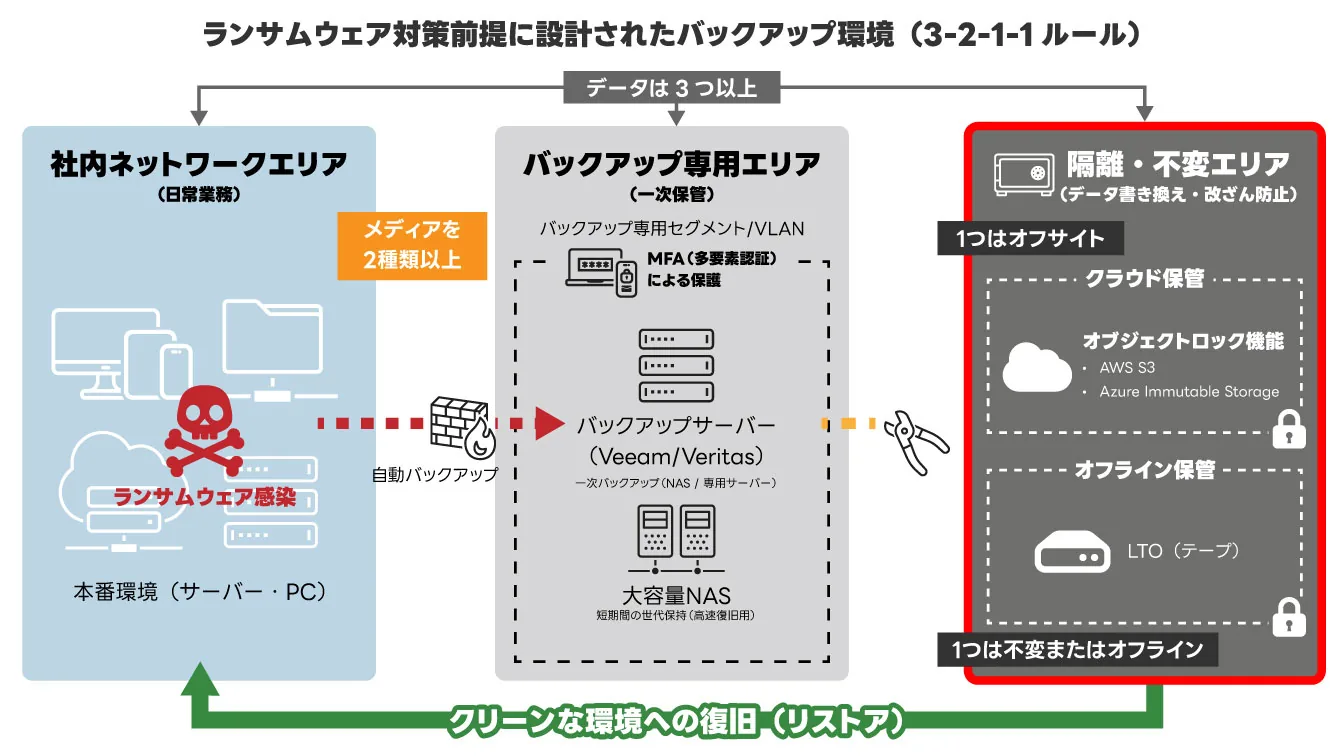
A case we hear about all the time in ransomware incident reports is "we had backups, but we still couldn't recover."
In fact, survey data shows that 70% to 80% of companies failed to recover even though backups existed.
The problem is not "whether there were backups" but whether the backups were designed with ransomware in mind.
This section explains why traditional backups no longer hold up and what practical backup measures are needed today.
Why traditional backups no longer work
Traditional backup operations were designed mainly for "recovering from failures and user mistakes." In ransomware attacks, however, that premise has completely collapsed.
Today's attackers search for backup servers and NAS devices right after breaking in, seize administrator privileges and then encrypt or delete the backup storage first.
As a result, the backups are lost along with the production data.
Particularly dangerous are backup storage that is permanently connected to the network and backup environments run under the same domain.
From an attacker's point of view, these are "assets that are part of the target from the start," and they can no longer be called a safe place to retreat to.
Stick to the 3-2-1 rule
The well-known basic principle of backup is the 3-2-1 rule. It means the following three things:
- Keep three or more copies of your data
- Store them on two or more different types of media
- Keep one copy in a physically separate location
The essence of this rule is "not creating a single point of failure."
By building a setup that does not depend on any particular device, network or administrator account, you can greatly reduce the risk of ransomware destroying everything at once.
What is an immutable backup?
An immutable backup is a backup method with a mechanism that prevents saved data from being changed or deleted for a set period.
Its defining feature is that saved data cannot be overwritten even if administrator privileges are stolen.
In recent years, features that make backups immutable by specifying a retention period have become widespread in object storage and backup products.
This prevents ransomware from destroying backup generations. What matters is to check not only that the immutable setting is "logically separated" but also that it is designed so it cannot be lifted in day-to-day operations either.
Misconfiguration or weak privilege management can greatly undermine its effectiveness.
What is an air-gapped backup?
An air-gapped backup is a method of storing data physically or logically disconnected from the network.
It is considered one of the strongest defenses against online attacks.
Typical examples include tape storage that is cut off from the network once the backup is complete, and regular offloading to offline media.
Even if an attacker breaks in, there is no access path at all, which greatly reduces the risk of the data being encrypted.
On the other hand, be aware of the operating cost and the time it takes to recover. A realistic design is therefore to combine it with immutable backups and air-gap only critical data.
Why regular recovery tests matter
The most commonly overlooked part of backup planning is regular recovery testing. Even if a backup exists, it is meaningless if you cannot actually restore from it.
Many companies feel reassured simply by checking logs that say "the backup succeeded" and never verify the restore procedure.
As a result, when an incident does occur, nobody knows the steps or the time needed to recover, and confusion follows.
A practical measure is to run recovery drills at least once a year and confirm in advance "which data" will be restored, "by whom" and "in what order."
For ransomware protection and recovery support, talk to CyberCrew first
When facing a ransomware attack, the hardest thing on the ground is that "nobody knows the right answer straight away."
Can we recover? How should we think about the ransom? How much should we explain inside and outside the company? Right after the damage is discovered is exactly when the information needed to make those decisions is missing.
To reduce situations like this in the first place, CyberCrew provides security support focused on preventive measures taken in advance. Our core services are penetration testing, vulnerability assessments, and early detection of data leaks through dark web monitoring.
"Understand your weaknesses before you are breached" and "keep the damage to a minimum even if you are breached": this is CyberCrew's basic stance.
At the same time, when damage has actually occurred, we sometimes get inquiries from people who "don't know where to start." We cannot take on the recovery work itself, but from a white-hat hacker's standpoint we may be able to advise on how to think through the situation and what not to do. Talking things through with us as a sounding board, so you avoid wrong decisions right after an attack, is not pointless.
With ransomware, the outcome depends heavily not on what you think about after an attack but on how well prepared you are before it happens. Even if you are not dealing with damage right now, a consultation at the stage of "we'd like to take stock of where our company stands" often turns out to be the most realistic first step.
Frequently asked questions (FAQ)
Here we answer questions that people often search for under "ransomware recovery," focusing on the points where it is genuinely hard to make decisions on the ground.
We give concise, realistic answers based on practice, statistics and experience on topics that are discussed only in fragments online, such as whether recovery is possible, cost and time benchmarks, how to treat ransom demands and the limits of backups.
Q1. What should we do first if we are infected with ransomware?
When a ransomware infection is suspected, the first thing we instruct in the field is "disconnect from the network immediately." Unplug LAN cables, disable Wi-Fi and cut VPN connections to stop the damage from spreading laterally to other devices and servers.
The next most important thing is not to power off or restart. A restart can resume encryption or wipe evidence in memory that a forensic investigation needs.
After that, record the threat screen, file extensions, time of discovery and so on, and consult an expert as soon as possible. In a great many cases, trying to recover on your own judgment ends up lowering the chance of a successful recovery.
Q2. How much does recovery cost?
Based on the real cases we have handled and the National Police Agency's statistics, it is by no means unusual for recovery costs to exceed 10 million yen.
In fact, according to the ransomware damage survey published by the National Police Agency for 2025 (Reiwa 7), 23 of 39 companies, about 59% of the total, spent 10 million yen or more on their recovery response.
Costs include not only the data recovery work itself but also forensic investigation, system rebuilding, losses from business disruption and the introduction of security measures to prevent recurrence.
Some executives think "wouldn't paying the ransom be cheaper?", but recovery work and rebuilding are still needed after paying, so it hardly ever ends up reducing costs.
Q3. How long does recovery take?
According to the 2025 (Reiwa 7) National Police Agency survey, only 10 of 47 companies, about 21% of the total, recovered within the same day to less than a week.
This is because, before the data restore itself, steps such as identifying the intrusion path, investigating the scope of the damage and checking that backups are sound are required.
Especially when Active Directory or cloud environments have also been compromised, just creating "a state in which recovery can be done safely" can take several weeks.
Q4. Should we pay the ransom?
Our position is clear: you should not pay the ransom.
In practice, cases where
• the decryption key is not provided
• the decryption tool is incomplete
• data is corrupted during decryption
occur frequently.
On top of that, giving in to the demand raises the risk of being extorted again or facing additional demands.
The police and security agencies around the world advise against paying because the recovery success rate is low and, in the long run, it is a decision that does not protect the company.
Q5. If we have backups, can we always recover?
Unfortunately, having backups does not guarantee recovery. Surveys show that about 70% of companies could not recover even though backups existed.
The reason is clear: in recent ransomware attacks, the backup storage itself is the top-priority target.
NAS devices and backup servers that are permanently connected to the network are often encrypted along with the production data.
What matters is not "whether you have backups" but whether your backups are designed with ransomware in mind.
Q6. Are small and medium-sized businesses also targeted by ransomware?
In fact, the National Police Agency's statistics show that about two thirds of victim companies are small and medium-sized businesses.
Thinking "we're too small to be targeted" is very dangerous.
Because they often have no dedicated security staff and insufficient backup and monitoring, small and medium-sized businesses tend to be seen by attackers as "targets that are easy to break into and easy to negotiate with."
When damage occurs, it is not unusual for the continuity of the business itself to be put at risk. Advance measures are essential regardless of size.
Q7. Are there free decryption tools?
For some ransomware, free decryption tools have been published through projects such as "No More Ransom."
However, they mainly cover a limited set of older variants. For the RaaS-type and double-extortion ransomware that dominate today, there is almost never a decryption tool.
So thinking "we're safe because there are free tools" is dangerous. They are valuable when they can be used, but understand that you should not expect too much.
Q8. Should we report it to the police?
You should always report it to the police cybercrime consultation desk. Reporting may get you guidance on decryption tools and cooperation with the investigation.
Having the damage officially on record is also important later for insurance claims and for explanations to outside parties.
Do not think "reporting is pointless"; understand that following the formal procedure helps protect your company.
Summary: what matters most in ransomware recovery
What matters in ransomware recovery is not "pushing through on sheer willpower" but seeing the reality correctly and not getting the order of steps wrong.
Recovery is not a story of "getting things back if you're lucky"; the outcome changes greatly with your preparation and the quality of your initial response.
There are five points in particular to keep in mind:
- Full recovery is not a given
Expecting "everything will go back to normal" leads to bad decisions. You need to set priorities and act on the assumption that full recovery is often impossible. - Cost and time weigh more heavily than you imagine
Recovery costs exceeding 10 million yen and more than a month before operations resume are not unusual. This is not just a problem for the IT department but a business risk tied directly to revenue, trust and contracts. - The initial response right after infection decides the outcome
How you act in the first few hours changes both how far the damage spreads and how hard recovery will be. The more you hesitate and keep operating systems, the worse things can get. - A "recoverable backup" is all about design
Even if you have backups, they will be taken down too if they hang off the same network or the same privileges. Only when they are made hard to destroy, with immutable or air-gapped storage, do they become "the last line of defense." - Recovery without drills and a plan does not work
If it is not decided "who" restores "what" and "in what order" when the time comes, recovery stalls. Recovery testing in normal times and well-organized decision-making and communication structures are what make the difference.
In the end, ransomware protection is not just a matter of "installing security products."
It is preparation for keeping the business running, and a business decision in its own right. So that you have no regrets after an attack, it is important to put entry-point defenses, backup design and initial response procedures in place, within realistic limits, while things are calm.
If you have concerns or questions, rather than carrying them alone, consulting experts like us at CyberCrew will ultimately be the fastest and best choice.